
Adra · How logging works
One photo. That is the whole input.
Plate, package, or label. Adra figures out what it is looking at and does the right thing. You never pick a mode.
The flow
-
Take one photo.
The camera does not ask what you are shooting. Aim and press.
-
Adra looks first.
The app checks what is in the picture. A barcode, a nutrition label, or a meal on a plate.
-
It picks the reader by itself.
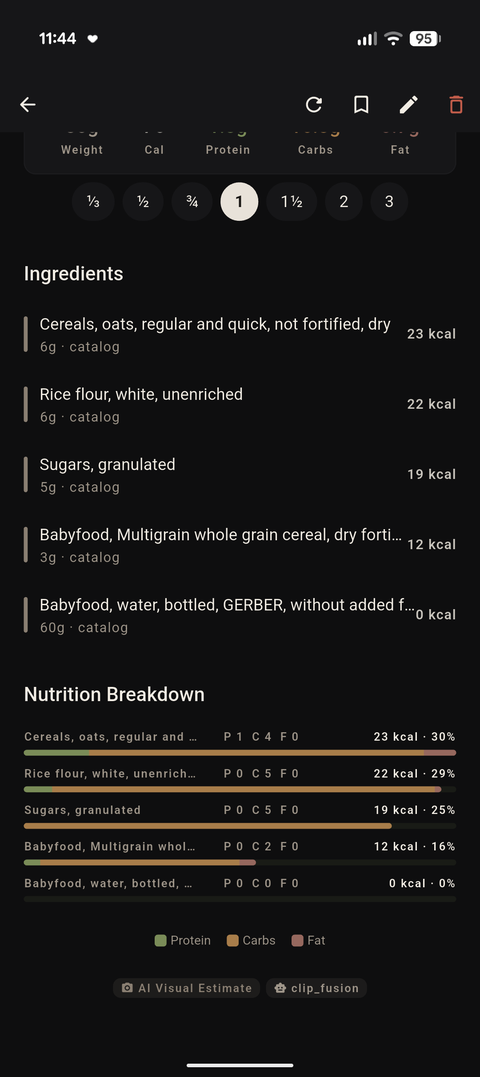
Packages go to the barcode lookup. Labels go to the label reader. Plates go to food recognition with an ingredient breakdown.
-
A missed barcode is not a dead end.
If the barcode is unknown, the same photo continues through the label and image path instead of failing.
-
You confirm and move on.
Adjust anything with the Fix it button, set the portion, and the day updates.
What happens behind the shutter
Every photo runs through the same three checks, in the same order. The routing is automatic and stays on the phone.
One photo in
├─ barcode found     → local catalog → bundled USDA data → Open Food Facts
├─ label found       → text read → table rebuilt → macros
└─ neither           → food detection + image match → ingredient breakdown

A missing barcode is not a dead end. The same photo continues down the list.
The first two stops are offline. Only the last barcode step, for products the local catalog does not know, asks a public database over the network.
Days of photos at once
Came home with twenty photos? Add them in one batch. Adra reads the recording date from each photo and files every meal on the right day.
All of this on your phone
Recognition, label reading, and matching run on the device. The food catalog travels with you. Airplane mode changes nothing.
The only online moment is a barcode lookup for packages the local catalog does not know, and even that request carries just the barcode number. The privacy page has the details.
Honest limits
-
A picture cannot weigh a plate.
Photo macros are estimates, and you confirm every value before it counts.
-
Labels are read, not guessed.
Printed values come in as printed. Estimates are for plates, not for tables.
-
Barcode lookups need a moment online.
Everything else works with no connection at all.
FAQ
Do I need to choose between photo, barcode, and label modes?
No. The app detects the type of image and routes it. One shutter button covers all three.
Does the photo flow work offline?
Yes. Photo recognition and label reading are fully on-device. A barcode lookup downloads on demand and only when the product is not already in the local catalog.
Can I log several photos at once?
Yes. Add a batch and Adra files each meal by the photo's own date.