
Adra · Photo to recipe
From photo to a recipe you can edit.
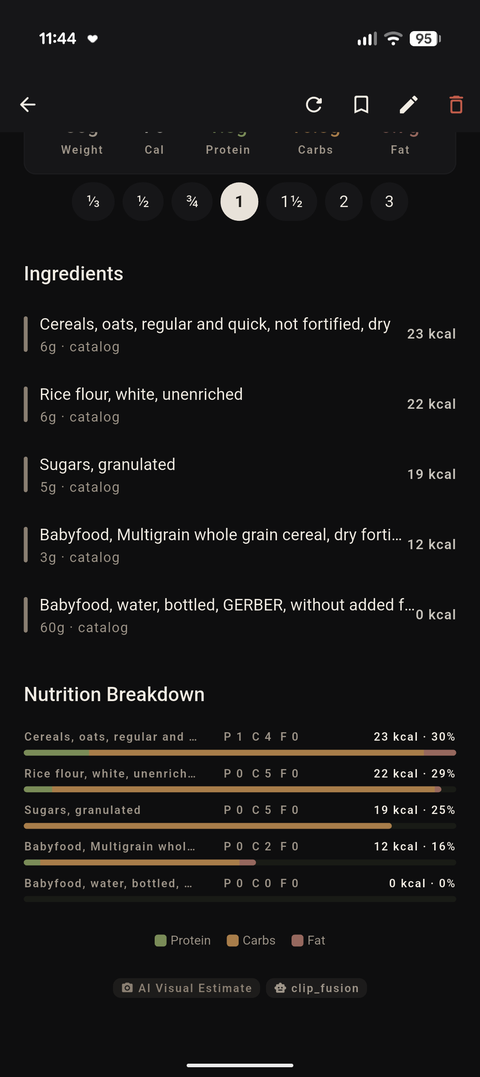
Adra turns a meal photo into a recipe with every ingredient listed and its macros attached. The ingredients come from a nutrition database, so you can see where each number comes from and change anything that differs from your plate.
Known ingredients, not generated ones
Many photo apps send your picture to a large language model and ask it to describe the meal. That model writes a new answer each time, and it can name ingredients that were never on the plate.
Adra works differently. It matches your photo to a dish, then opens that dish's recipe from a database that ships with the app. The list you see was written by nutrition researchers, so it stays the same every time and nothing in it is invented.
No generative AI writes your ingredient list, so it has nothing to hallucinate.
Recipes: 5,432 recipes and 18,254 ingredient lines from USDA's Food and Nutrient Database for Dietary Studies (FNDDS), counted in the app's bundled database on November 1, 2026. Repeatability: repeated runs of Adra's evaluation set returned identical results (Adra evaluation harness, September 27, 2026).
How it works
-
Take a photo.
Adra compares the picture with thousands of food concepts on your phone and suggests the closest dish, with other likely matches one tap away.
-
Adra opens the recipe.
The dish arrives as a list of ingredients, each with its own calories, protein, carbs and fat.
-
Make it yours.
Adjust the recipe until it matches what you cooked. The totals update as you go.
-
Save your version.
Saved dishes keep your ingredients and your photo. The next time you photograph that dish, Adra can match your version first.
Everything is editable
-
Change an amount.
Set the grams for any ingredient, or scale the whole meal to your portion. Macros follow in proportion.
-
Add an ingredient.
Search 247,065 foods, photograph the ingredient, or scan its barcode.
-
Remove an ingredient.
Cooked without the cream? Take it out and the numbers adjust.
-
Pick a different dish.
If another dish fits better, choose it from the suggestions or search for it. Its recipe replaces the first one.
Portion size is the one thing a photo cannot measure, so Adra starts from what you usually log and lets you set the amount. Photo values stay estimates until you confirm them, and that control is the point of working with a recipe.
FAQ
Does Adra guess the ingredients?
No. Adra suggests a dish from your photo, and the ingredients come from that dish's recipe in the bundled USDA FNDDS database. You can then change them to match your plate.
Can I save my own recipes?
Yes. Save an edited dish with its photo, and Adra can recognize it from your next photo. The recipe and the photo stay on your phone.
Is photo to recipe a paid feature?
No. It is part of the free version, like every other way of logging.